![Mosaic Full Logo Blue (Transparent).png]](https://support.mosaic-solutions.com/hs-fs/hubfs/Mosaic%20Full%20Logo%20Blue%20(Transparent).png?height=31&name=Mosaic%20Full%20Logo%20Blue%20(Transparent).png)
1. Log in to the Mosaic Analytics Inventory Console.
https://backoffice-console.mosaic-pos.com/
2. Click on the 3-lines to display the side-panel menu.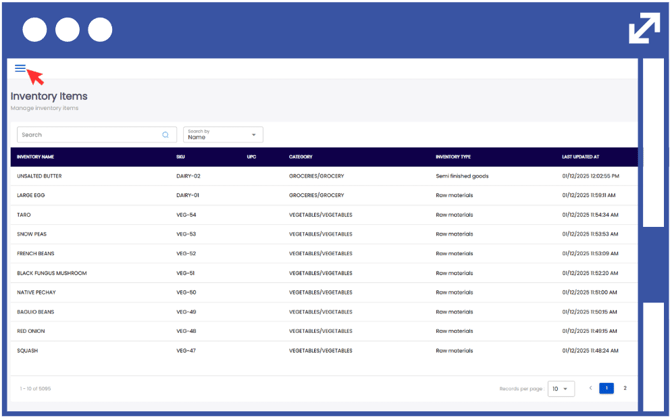
3. On the side-panel menu, click on "Inventory".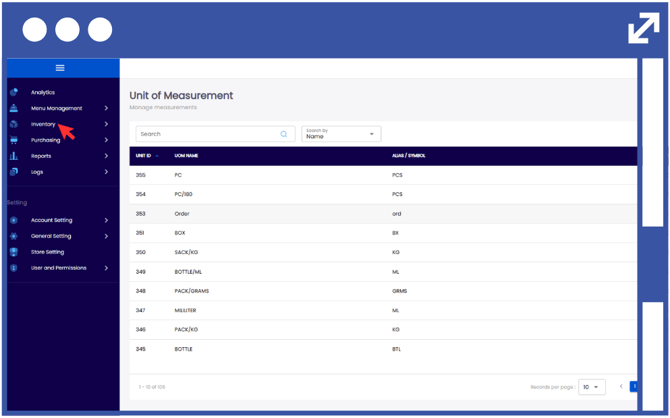
4. Select "My Inventory".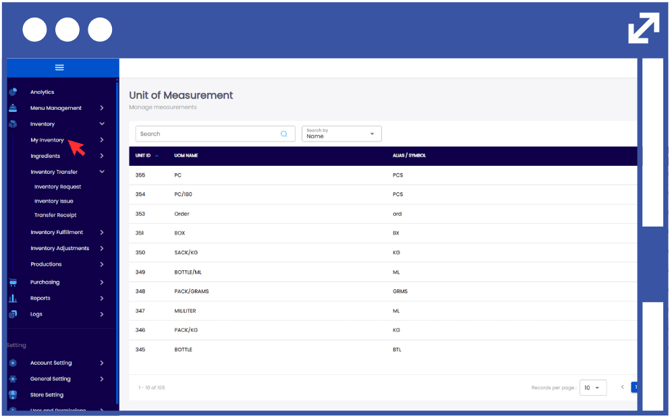
5. Select "Ingredients".
6. Click "Sub Recipe Composition".
Note: Search for an existing product using the search bar, or filter the results by selecting Name or SKU from the drop-down list.
7. In order to modify the Sub Recipe Composition, click on the action button using the three-dots.
8. Click "Edit".
9. Select "Add Ingredient".
10. Click the drop-down arrow to display the list of created inventory items, and select the ingredient to be used.
11. Enter the required quantity according to the ingredient breakdown.
12. Click "Add Ingredient" to add additional items.
Notes:
The cost per unit and cost estimation will be automatically automatically computed from your account data.
13. Click "Update".