---
title: Understanding Filters - Resto iQ Analytics
description: Filters in Resto iQ allow users to narrow down the data and information to which is most relevant and important. The filters are always on top, and directly affects the value cards below.
---
[Skip to content](https://support.mosaic-solutions.com/knowledge/understanding-filters-resto-iq-analytics#main-content)
English
Show submenu for translations
[Contact Customer Support](https://support.mosaic-solutions.com/knowledge/kb-tickets/new?hsLang=en)
![Mosaic Full Logo Blue (Transparent).png\]](https://support.mosaic-solutions.com/hs-fs/hubfs/Mosaic%20Full%20Logo%20Blue%20(Transparent).png?height=31&name=Mosaic%20Full%20Logo%20Blue%20(Transparent).png)
- [Contact Client Support](https://support.mosaic-solutions.com/helixpaysupport/contactus)
Open main navigation
Close main navigation
- [Contact Client Support](https://support.mosaic-solutions.com/helixpaysupport/contactus)
- English
Show submenu for translations
- [Contact Customer Support](https://support.mosaic-solutions.com/knowledge/kb-tickets/new)
- Go to mosaic-solutions.com
Go to mosaic-solutions.com
We are here to help.
- There are no suggestions because the search field is empty.
1. [Mosaic Solutions Support and Help Center](https://support.mosaic-solutions.com/knowledge?hsLang=en)
2. [Resto iQ Analytics](https://support.mosaic-solutions.com/knowledge/resto-iq-analytics?hsLang=en)
3. [General Knowledge](https://support.mosaic-solutions.com/knowledge/resto-iq-analytics?hsLang=en#general-knowledge)
# Understanding Filters - Resto iQ Analytics
## Filters in Resto iQ allow users to narrow down the data and information to which is most relevant and important. The filters are always on top, and directly affects the value cards below.
Filters in Resto iQ allow users to narrow down the data and information to which is most relevant and important. The filters are always on top, and directly affects the value cards below.
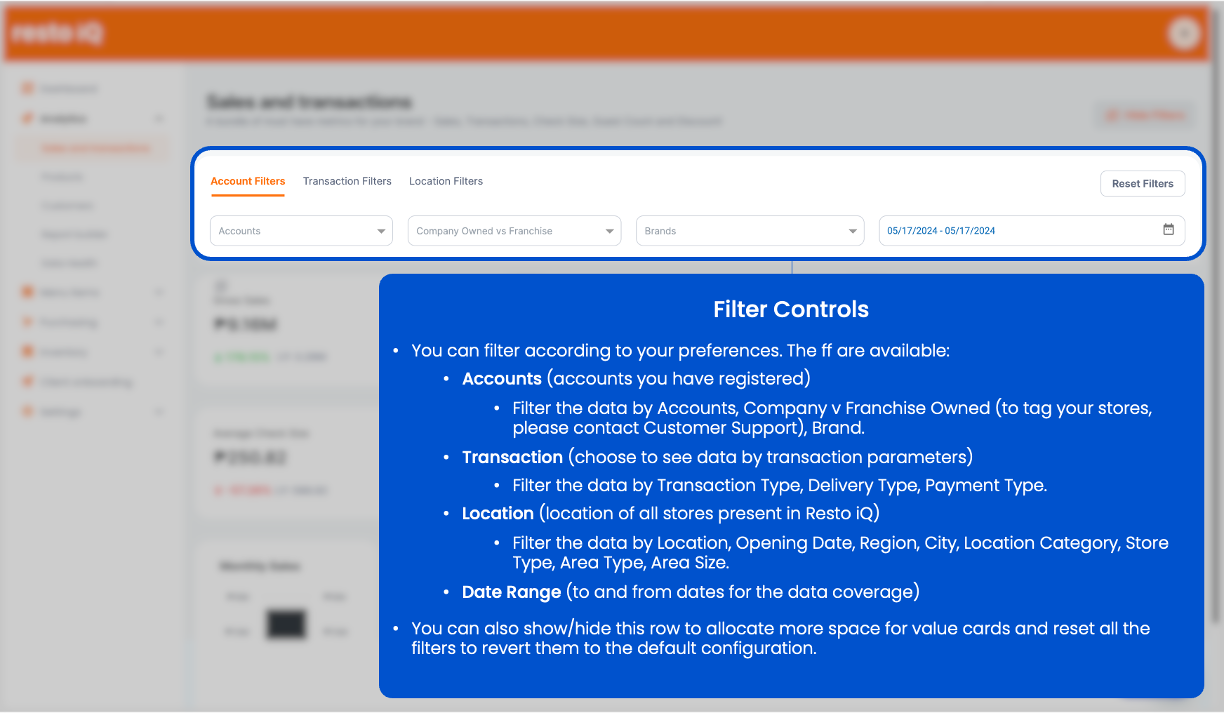
#### Account

These are accounts you have registered. You may filter data by the following:
- By Accounts
- Company v Franchise Owned (to tag your stores, please contact Customer Support)
- By Brand
These can be very useful even for large organizations where there are multiple brands and/or accounts in their operations. You may even view the performance of franchise-owned stores vs your company owned stores.
#### Transaction

Choose to see data by transaction parameters. These can be useful to isolate information and review trends and tendencies of your market. You may filter by (but is not limited to the following):
- By Transaction Type
- These are your preconfigured service types. Commonly: Dine-In, Take-out, Delivery, etc.
- By Delivery Type
- These are your preconfigured delivery types. Commonly: Grabfood, Foodpanda, etc.
- Payment Type
- These are your preconfigured payment types. Commonly: Cash, GCash, Maya, Credit Card, etc.
#### Location
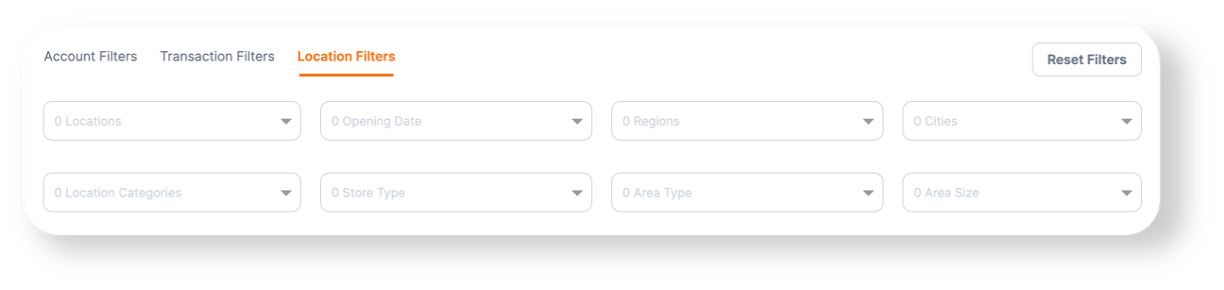
Choose to see the data by location. This is very useful for multi-region operations, where you wish to view the performance of the location relative to another. Not only the user can compare results of each store, but the user can also understand further which area/region/location is most profitable and even investigate further the tendencies of the market relative to other places. The user may filter by:
- Location \*
- Opening Date \*
- Region
- City
- Location Category \*
- Store Type \*
- Area Type \*
- Area Size \*
\* - Locations and these highlighted dimensions need to be manually tagged by connecting with Customer Support.
These filters may seem complex and overwhelming; however, this provides users a powerful way for understand their market in more ways the traditional methodologies.
- [Mosaic POS](https://support.mosaic-solutions.com/knowledge/mosaic-pos?hsLang=en#main-content)
- [Placing Orders and Table Management](https://support.mosaic-solutions.com/knowledge/mosaic-pos?hsLang=en#placing-orders-and-table-management)
- [Logging In, Shift Change, Day End](https://support.mosaic-solutions.com/knowledge/mosaic-pos?hsLang=en#logging-in-shift-change-day-end)
- [Billing and Payment Processing](https://support.mosaic-solutions.com/knowledge/mosaic-pos?hsLang=en#billing-and-payment-processing)
- [Getting Started with your POS](https://support.mosaic-solutions.com/knowledge/mosaic-pos?hsLang=en#getting-started-with-your-pos)
- [Basic Troubleshooting](https://support.mosaic-solutions.com/knowledge/mosaic-pos?hsLang=en#basic-troubleshooting)
- [Generating Reports](https://support.mosaic-solutions.com/knowledge/mosaic-pos?hsLang=en#generating-reports)
- [Menu Management](https://support.mosaic-solutions.com/knowledge/mosaic-pos?hsLang=en#menu-management)
- [Integrations](https://support.mosaic-solutions.com/knowledge/mosaic-pos?hsLang=en#integrations)
- [Getting Started in Resto iQ](https://support.mosaic-solutions.com/knowledge/getting-started-in-resto-iq?hsLang=en#main-content)
- [General Knowledge](https://support.mosaic-solutions.com/knowledge/getting-started-in-resto-iq?hsLang=en#general-knowledge)
- [User Management](https://support.mosaic-solutions.com/knowledge/getting-started-in-resto-iq?hsLang=en#user-management)
- [Navigation](https://support.mosaic-solutions.com/knowledge/getting-started-in-resto-iq?hsLang=en#navigation)
- [Resto iQ Analytics](https://support.mosaic-solutions.com/knowledge/resto-iq-analytics?hsLang=en#main-content)
- [Product Reports](https://support.mosaic-solutions.com/knowledge/resto-iq-analytics?hsLang=en#product-reports)
- [Sales Reports](https://support.mosaic-solutions.com/knowledge/resto-iq-analytics?hsLang=en#sales-reports)
- [General Knowledge](https://support.mosaic-solutions.com/knowledge/resto-iq-analytics?hsLang=en#general-knowledge)
- [Other Reports](https://support.mosaic-solutions.com/knowledge/resto-iq-analytics?hsLang=en#other-reports)
- [Resto iQ Inventory and Purchasing](https://support.mosaic-solutions.com/knowledge/resto-iq-inventory-and-purchasing?hsLang=en#main-content)
- [Resto iQ Inventory - Reports](https://support.mosaic-solutions.com/knowledge/resto-iq-inventory-and-purchasing?hsLang=en#resto-iq-inventory-reports)
- [Resto iQ Inventory - My Inventory](https://support.mosaic-solutions.com/knowledge/resto-iq-inventory-and-purchasing?hsLang=en#resto-iq-inventory-my-inventory)
- [Resto iQ - Purchasing](https://support.mosaic-solutions.com/knowledge/resto-iq-inventory-and-purchasing?hsLang=en#resto-iq-purchasing)
- [Resto iQ Inventory - My Ingredients](https://support.mosaic-solutions.com/knowledge/resto-iq-inventory-and-purchasing?hsLang=en#resto-iq-inventory-my-ingredients)
- [Resto iQ Inventory - Menu Items](https://support.mosaic-solutions.com/knowledge/resto-iq-inventory-and-purchasing?hsLang=en#resto-iq-inventory-menu-items)
- [Mosaic Analytics](https://support.mosaic-solutions.com/knowledge/mosaic-analytics?hsLang=en)
- [Mosaic Inventory v2](https://support.mosaic-solutions.com/knowledge/mosaic-inventory-v2?hsLang=en)
- [Mosaic Purchasing v2](https://support.mosaic-solutions.com/knowledge/mosaic-purchasing-v2?hsLang=en)
- [Mosaic Back Office v2](https://support.mosaic-solutions.com/knowledge/mosaic-back-office-v2?hsLang=en)
- [Contact Client Support](https://support.mosaic-solutions.com/helixpaysupport/contactus)
[](https://support.mosaic-solutions.com/?hsLang=en)
Mosaic Solution Support and Help Center
Copyright © 2026, Mosaic Solutions