.png?width=201&height=50&name=HP_TICKETING%20SOLUTIONS_LOGO-BLACKDSFAS%20(1).png)
Selling Plans
Selling Plans are automation rules that help event organizers implement dynamic ticket tiering without manual intervention. You set a condition (e.g., "Product must be sold out") for a specific product, and define an action (e.g., "Show" or "Hide") for target products. Once the condition is met, the action executes automatically.
Example: You can configure an Early Bird ticket as the trigger product, set the condition to Sold Out, and set the action to Show your Regular tickets as the target. When Early Bird supply runs out, the Regular Tickets automatically become visible on the storefront—ensuring a seamless, hands‑off transition between pricing tiers.
Configure your Selling Plans by following these steps:
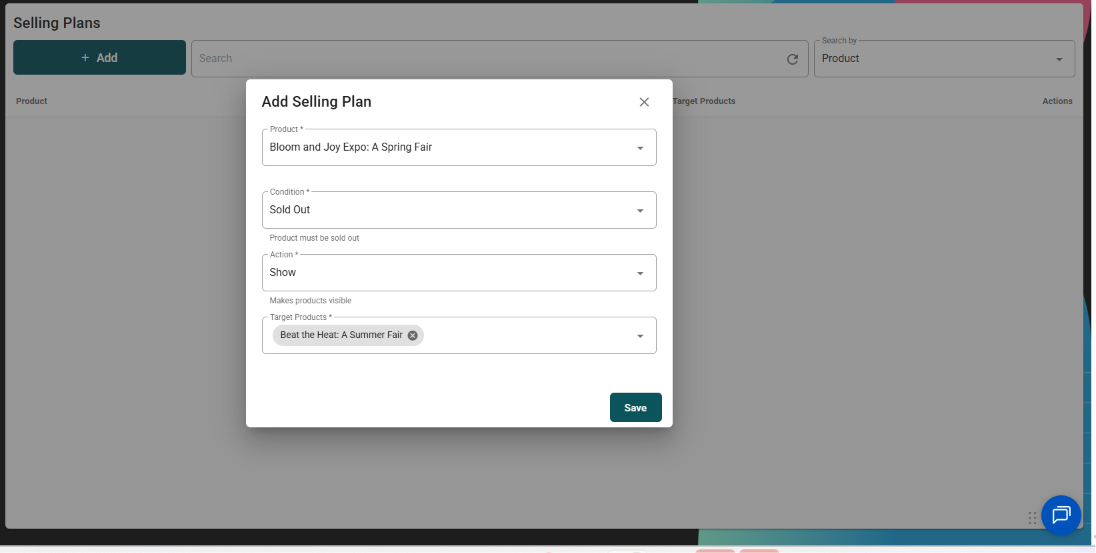
1. Click the “+Add” button

2. Configure the Selling Plan for a specific product.
- Select the trigger product.
- Mark “Sold Out” as the condition.
- Click “Show” to make the next target product visible or “Hide” to make it unavailable.
- Click “Save”.
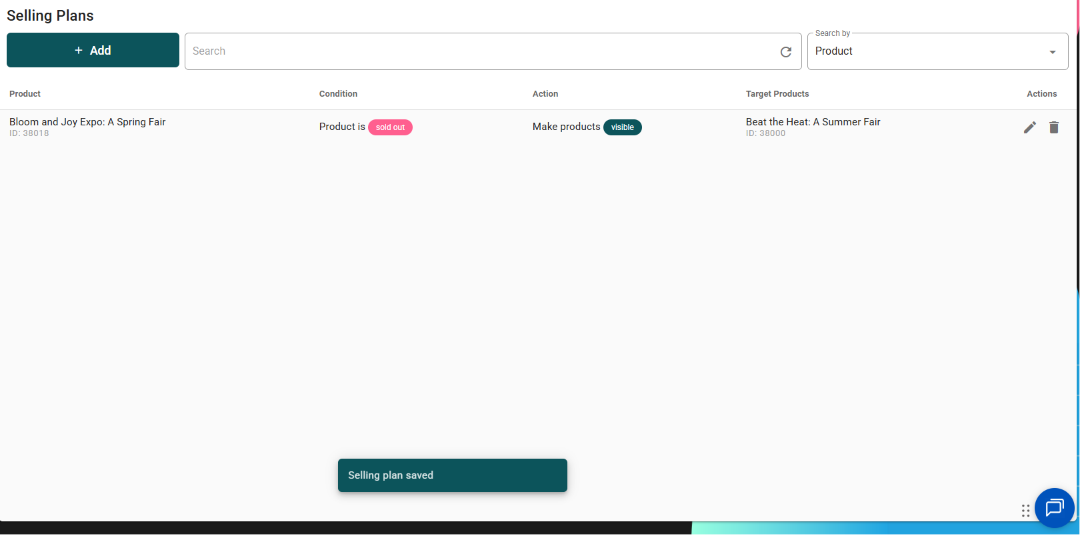
3. See the Selling Plan reflected on your console.